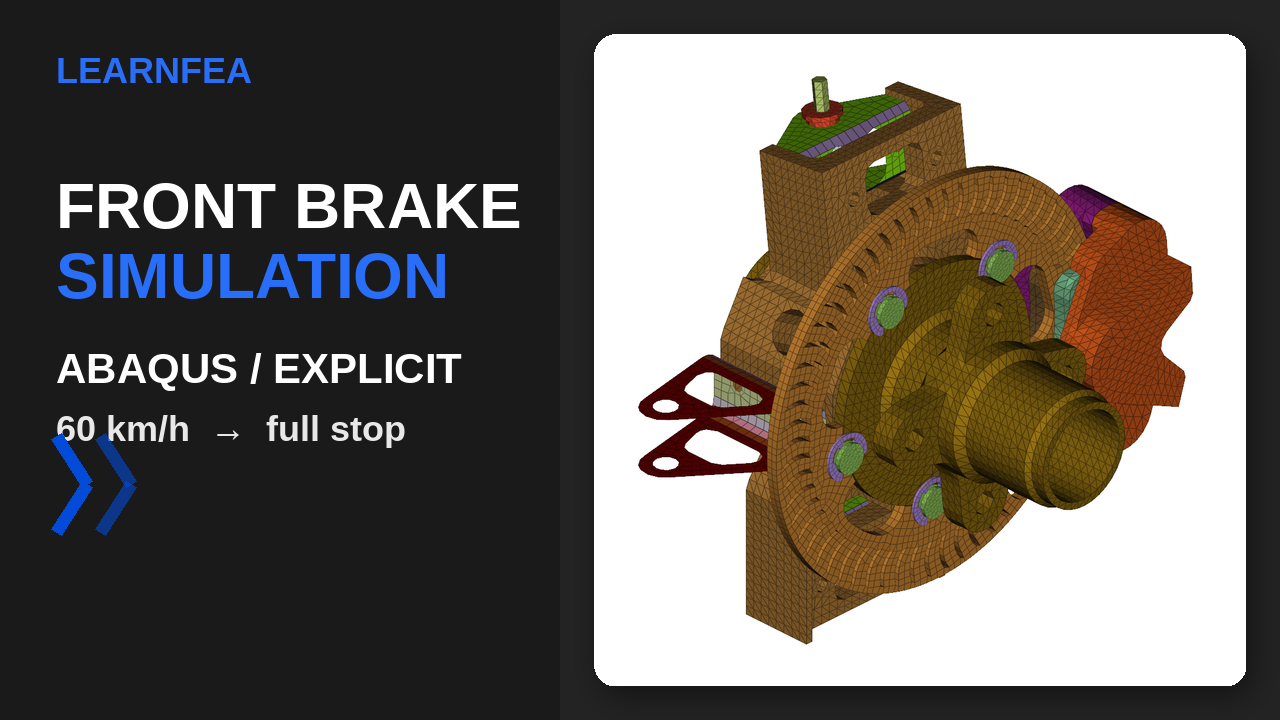
How a crosskart disc brake was built so the stop comes from physics, not from a prescribed load: a spinning wheel, a clamping caliper, and friction left to do the work.
LearnFEA · Explicit dynamics case study
Most brake simulations start from the wrong end: a torque curve is written into the model, and the solver simply plays it back. That tells you nothing about whether the clamp force, the friction coefficient, and the rotating mass you specified could actually produce that torque in the first place.
This model works the other way around. It starts the wheel spinning at a known road speed, closes a caliper onto a disc with a real clamp force, and lets Coulomb friction generate the braking torque on its own. If the setup is right, the vehicle stops in a time that matches hand calculations. If it isn't, the model tells you so — and that cross-check is the backbone of everything that follows in this post.
Three numbers decide whether the model is honest
Before any contact or mesh decision, three physical inputs fix the problem: how fast the wheel is spinning, how much rotating mass that wheel represents, and how hard the caliper clamps down. All three come from the vehicle, not from the mesh, and all three are worked out by hand before the keyword file is touched.
Step 1 — initial spin rate
60 km/h is 16.667 m/s. Dividing by the 260 mm tire radius gives the wheel's initial angular velocity directly: ω₀ = v / rtire = 16.667 / 0.260 = 64.1026 rad/s. This is what goes into *INITIAL CONDITIONS, TYPE=ROTATING VELOCITY on the spinning assembly.
Step 2 — the vehicle-equivalent rotary inertia
A bare wheel-hub-disc assembly has very little rotary inertia on its own — on the order of 1,380 t·mm² for the disc, pin, button and hub alone. Spinning that down with a real brake torque would stop the wheel almost instantly, which is not what a real braking vehicle does: the wheel is also carrying the vehicle's translational inertia, reflected through the tire contact patch.
The standard way to fold that into a single-wheel rotational model is to add a lumped inertia at the hub's rotation axis sized so that the wheel's rotational kinetic energy equals the share of the vehicle's translational kinetic energy that this wheel is responsible for dissipating:
With Ieq = 7,220 t·mm² and rtire = 260 mm, that fixes meff = Ieq / rtire² = 7,220 / 67,600 ≈ 0.1068 t ≈ 107 kg — the portion of the vehicle's mass this front wheel is modeled as decelerating. That number comes straight out of the vehicle's own weight-transfer calculation, not from an assumed round figure:
| Input | Value |
|---|---|
| Vehicle mass (chassis + running gear) | 205 kg |
| Vehicle mass with driver | 280 kg |
| Static weight split, front/rear | 50% / 50% |
| CG height, h | 268 mm |
| Wheelbase, L | 1,530 mm |
| Target deceleration, a | 1.5 g |
Braking shifts load onto the front axle. The longitudinal weight-transfer fraction is (a/g)·(h/L) = 1.5 × (268/1,530) = 0.263, added to the 50% static split: the front axle carries 76.3% of the vehicle's weight during the stop, the rear axle the remaining 23.7%.
Assuming each axle brakes in proportion to the load it's carrying at that instant (the ideal-adhesion case, where every tire is at the same slip), the total braking force F = m·a = 280 × 1.5 × 9.81 ≈ 4,120 N splits into 3,143 N on the front axle, or 1,571 N per front wheel. At the 260 mm tire radius — the rolling radius of a 20.5" tire on a 13" rim — that wheel force produces a torque demand of 1,571 × 0.260 ≈ 409 N·m, and an effective mass of Fwheel / a = 1,571 / (1.5·9.81) ≈ 106.8 kg. Both numbers land within rounding of the 409 N·m target torque and 107 kg equivalent mass already built into the model — the two independent routes to this model's inputs agree.
That lumped inertia is applied as a single *ELEMENT, TYPE=ROTARYI at the hub's rotation reference node, with its three components aligned to the global axes (no local orientation on this element):
- I22 = 7,220 t·mm² about global Y, the actual wheel spin axis — the physically meaningful term.
- I11 = I33 = 10 t·mm² about the two transverse axes — the wheel never rotates about these, so they carry no real physics. They only need to be non-zero because the node's rotational degrees of freedom are activated by the rigid MPC-beam patches around it, and a zero rotary mass there is singular.
Setting all three components equal and large would seem like the safe choice, on the reasoning that a stiffer hub can't hurt. It does the opposite: Abaqus/Explicit's automatic mass scaling sees that artificially large transverse rotary mass and augments the surrounding nodal masses by more than 700% to keep the stable time increment reasonable, which produces a large, rotation-synchronous whirl of the hub that has nothing to do with the real brake event. Keeping only the spin-axis component physically large avoids the whirl and keeps the hub's radial wobble down to 0.0026 mm.
Step 3 — sizing the clamp force from the target torque
The weight-transfer calculation above already pins the torque this wheel's rotating assembly needs to see at 409 N·m. The same number falls out of the rotational form, Ieq·a/rtire = 7.22 kg·m² · (1.5·9.81 m/s²) / 0.260 m ≈ 409 N·m, which is the version Abaqus actually cares about, since the model only knows about Ieq and rtire, not about axle loads.
That torque is produced by Coulomb friction (μ = 0.4) acting on both pad faces, at the effective radius reff where the pad's friction force is assumed to act — roughly the centroid of the pad's contact patch:
With the pad's effective radius at about 81 mm (typical for this disc's geometry) and μ = 0.4, solving for N gives the clamp force actually applied to the model: N = 6,306 N, ramped onto the CALIPER_PISTON_TRANSLATOR connector over the first 0.03 s of the step with a smooth-step amplitude, so the load builds in rather than hitting the pads as a step function.
Crucially, none of that torque or clamp-force math is ever told to Abaqus directly. Only the 6,306 N connector load, the 0.4 friction coefficient, and the contact geometry go into the model; the ~409 N·m of braking torque and the resulting deceleration come out of the solution as a consequence of friction acting over the real contact area. The hand calculation above exists purely to size the clamp force and to give the simulation's result something honest to be checked against.
That inertia split is the detail that is easy to miss and expensive to get wrong. Early in this model, all three rotary-inertia components were set equal and large, which did control hub wobble — but it also meant the "flywheel" resisted spin-up and slow-down about every axis, not just the one the wheel actually rotates about. The disc then stopped roughly five times faster than it should have. Splitting the inertia — a large value only on the spin axis, small values on the other two — fixed both problems at once: a stable hub, and a stopping time that lines up with the hand calculation.
Every part, set, and interaction is named for what it does
Every part, material, surface, and constraint in the deck is named for what it actually is — the disc, the caliper body, the piston, the pad on each side, the hub, the knuckle — identified from the mesh geometry and connector topology. Anyone opening the .inp file below can follow the assembly directly in the keywords, without a drawing open alongside it.
| Keyword block | Naming convention used |
|---|---|
*PART / *INSTANCE | Disc, caliper body, piston, pad-piston-side, pad-reaction-side, hub, knuckle — one descriptive name per physical component |
*SURFACE | SURF_DISC_FACE_PISTON_SIDE, SURF_PAD_REACTION_FRICTION_FACE — face and role spelled out together |
*TIE | Named by the two parts joined, e.g. TIE_HUB_TO_DISC, so a singularity found later points straight back to a named constraint |
*MATERIAL | Named by alloy, not by number — MAT_GRAY_CAST_IRON_DISC rather than M1 |
How the assembly is actually connected
The disc in this design floats on the hub rather than bolting to it rigidly: it's carried by a set of pins and buttons that let it expand with heat without binding. That's modeled with *TIE constraints between disc, pin, button, and hub — rigid, no relative motion, but only because the real hardware doesn't allow relative motion either. The caliper's reaction-side pad is tied to the caliper body the same way, since that side is bolted solid.
The piston-side pad is deliberately left out of that tie chain. It's carried only by the CALIPER_PISTON_TRANSLATOR connector and the general-contact friction against the disc face — because that's the only location in the real caliper where the pad is free to float and clamp, and it's the only place in the model where braking torque is allowed to be generated. Getting this one connection wrong (tying it like the reaction side) would make the model brake correctly for the wrong reason.
The knuckle's kingpin pivot is constrained in translation (all three axes) and in two of its three rotations, leaving only the rotation about the kingpin's own steering axis free — appropriate for a pure braking case with no steering input. Contact everywhere else is handled by a single model-level *CONTACT (General Contact) definition with Coulomb friction, μ = 0.4, assigned to the pad/disc pairs.
The caliper's piston-side and reaction-side bodies are tied directly to each other across the bridge that casts them as one physical part, rather than being left to stay aligned only through the pads, the disc, and the piston connector. That one extra *TIE is what a floating caliper actually is in hardware — two halves joined rigidly through the bridge — and modeling it that way removes a path for the two halves to flex relative to each other during the clamp-and-release cycle. The effect shows up directly in the piston-gap signal and in the energy balance below: both get noticeably quieter once the caliper is tied together as a single rigid body.
Hex where contact happens, tets everywhere else
The assembly runs to about 137,000 nodes and 77,000 elements in total, split between two meshing strategies depending on what each part needs to get right.
| Part | Element type | Elements |
|---|---|---|
| Brake disc rotor | C3D8 hex, C3D6 wedge at transitions | 2,728 |
| Disc pin / button | C3D8 hex, C3D6 wedge at transitions | 235 |
| Pad, piston side | C3D4 linear tet | 1,251 |
| Pad, reaction side | C3D4 linear tet | 1,326 |
| Caliper body, piston side | C3D4 linear tet | 7,364 |
| Caliper body, reaction side | C3D4 linear tet | 5,767 |
| Floating pin | C3D4 linear tet | 5,410 |
| Wheel hub body | C3D4 linear tet | 18,356 |
| Knuckle / upright | C3D4 linear tet | 29,805 |
The disc and the pin/button are swept with structured hexahedral elements, around 2.5–3 mm on a side, so the contact pressure across the pad width is resolved by several elements instead of one. Every other part — pads, caliper bodies, hub, knuckle, the floating pin — is free-meshed with linear tetrahedra, targeting roughly 3–5 mm and tightening automatically at fillets, bushings, and the smaller bracket features where the curvature needs it.
Seven alloys, each with bilinear plasticity
The assembly uses seven distinct materials, each with a bilinear hardening curve (yield point, then a straight line to an ultimate stress at a defined plastic strain), using properties that are commonly published and easy to verify independently against a datasheet.
| Part | Material | E (GPa) | Yield (MPa) | Ultimate (MPa) |
|---|---|---|---|---|
| Brake disc | Gray cast iron, Class 30 | 110 | 180 | 260 |
| Caliper body | Structural steel, A36 equiv. | 200 | 250 | 400 |
| Hub / knuckle | AISI 4140, quenched & tempered | 205 | 655 | 1,020 |
| Piston | Phosphor bronze, C544 | 110 | 310 | 420 |
| Pad backing plate | Aluminum 6061-T6 | 69 | 276 | 310 |
| Adapter bracket | Aluminum 7075-T6 | 71 | 503 | 572 |
| Fasteners / pins | Alloy steel, grade 8 equiv. | 205 | 900 | 1,034 |
Representative values compiled from commonly published engineering references; verify against a datasheet before using in a design calculation.
The "alarming" stress was a modeling artifact, not a part failure
The Mises stress contour shows a spike far past the yield point of the local material at four specific locations. That's the moment to stop and ask a second question before trusting the first number: is this a real overload, or a numerical singularity?
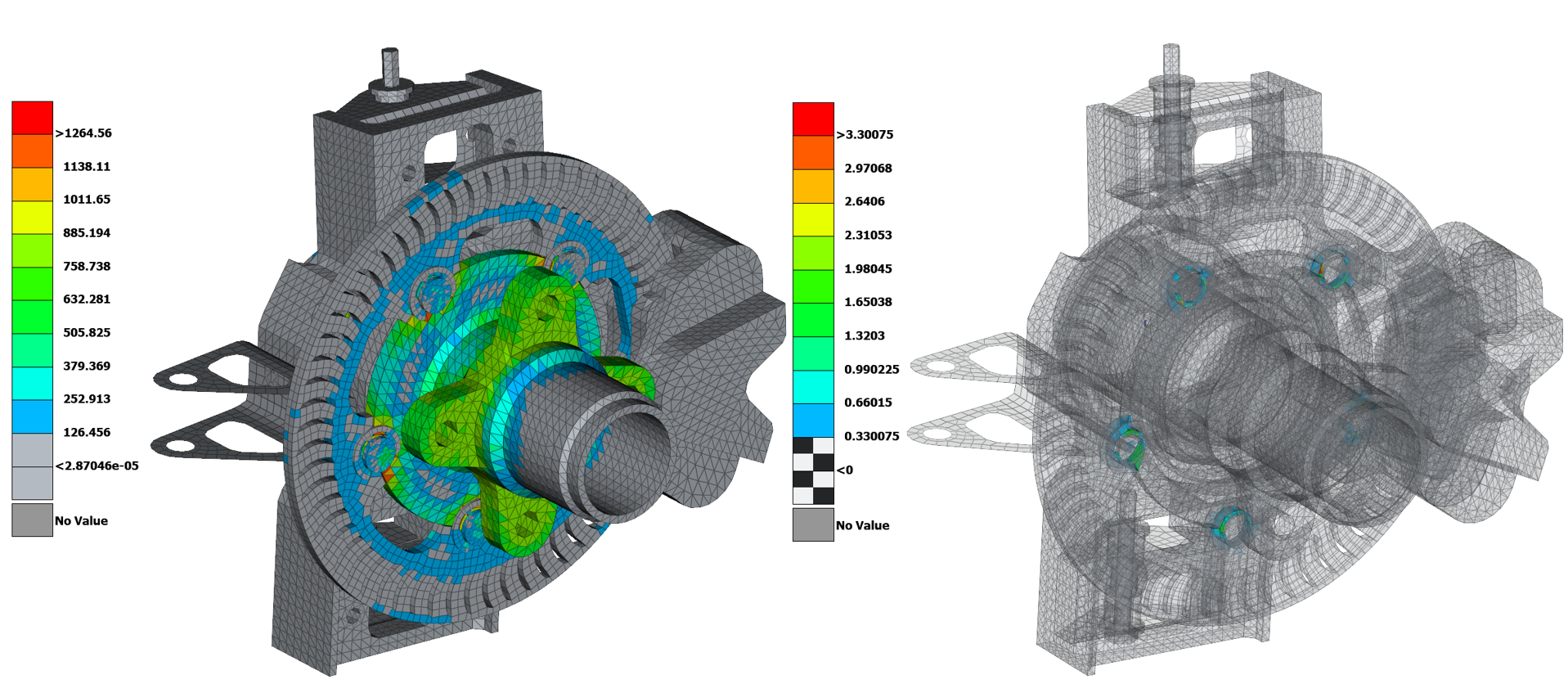
Mises stress alone can't answer that question, because a tied node at a mesh transition can report a huge local stress without the surrounding material actually yielding in a meaningful way — the stress is real in the arithmetic, but it doesn't represent what the part is doing. The equivalent plastic strain, PEEQ, is the better diagnostic: if a region is genuinely overloaded, the plastic strain there should be physically plausible; if a region shows enormous strain confined to a single row of elements at a constraint, that's a signature of a *TIE-interface singularity, not a structural failure.
Adding PEEQ to the element output request settled the question. Every part outside the disc's mounting chain — both pads, both caliper bodies, the knuckle, the kingpin hardware, the steering bracket, the bushings — stays below its own yield point for the entire event, which means effectively no plastic strain at all. The disc's floating-mount chain is the exception: the disc rotor, the pin, the button, and the hub body all show Mises stress 1.47–1.56× their respective yield points, with PEEQ reaching from 95.6% on the disc rotor up to 330% on the floating pin. Every one of those four parts sits directly on a *TIE boundary; nothing outside that chain comes close. That pattern — large strain confined to a handful of parts that are all tied together, nothing comparable anywhere else in a 77,000-element model — is the fingerprint of a mesh-transition singularity, not a failing part.
Energy balance is the fastest health check in Explicit
Before trusting any stress result from an Explicit run, check the energy history. Kinetic energy should fall smoothly as friction converts it to heat and strain energy, and the artificial energy introduced by mass scaling and contact penalties should stay a small fraction of the internal energy — a rule of thumb used throughout this model is keeping ALLAE under roughly 5% of ALLIE.
The step itself is a single *DYNAMIC, EXPLICIT step, 2.0 s long, with NLGEOM=YES so large rotations and the piston's travel are tracked correctly, and field output written at 120 evenly spaced frames across the step — frequent enough to read the contact engagement and the stress/PEEQ evolution smoothly in the animation, without writing an unmanageable odb.
Mass scaling is set with *FIXED MASS SCALING, TYPE=BELOW MIN, DT=5E-6. In an explicit run, the global time increment is capped by whichever single element in the whole mesh has the shortest stable time increment — almost always the smallest, most distorted tet in the pad/disc contact zone. Left alone, that one element can force every other element in a 77,000-element model to take a far smaller step than it actually needs.
Abaqus/Explicit estimates each element's own stable time increment from its characteristic length and the speed at which a stress wave crosses it:
Le is the element's characteristic length (roughly its smallest dimension) and cd is the material's dilatational wave speed, set by its stiffness (λ, μ — the Lamé constants, derivable from E and ν) and its density ρ. A smaller element, or a stiffer, lighter material, pushes a wave through faster relative to its size, so Δtstable shrinks; the global increment Abaqus actually uses for the whole model is the smallest Δtstable found anywhere in the mesh.
λ and μ aren't the numbers in a material datasheet, so it's easier to see the dependence on the properties that are: Young's modulus E and density ρ. Dropping Poisson's ratio's contribution (treating the material as a simple 1D bar instead of a full 3D continuum) reduces the wave speed to its most recognizable form, and the stable time increment with it:
Abaqus's actual calculation uses the full λ,μ form above; this E-and-ρ version is the one worth keeping in mind by hand, because it makes the two levers explicit — a stiffer material (higher E) shrinks Δtstable, a denser one grows it — which is exactly the lever mass scaling pulls.
That formula is also what makes mass scaling work: ρ sits in the denominator under the square root, so increasing an element's density lowers cd, which raises its Δtstable — without changing Le or touching the stiffness, geometry, or contact behavior at all. TYPE=BELOW MIN, DT=5E-6 tells Abaqus to find every element whose own Δtstable falls short of 5×10⁻ s and add exactly enough artificial mass, once, at the start of the step, to raise that element's Δtstable up to the floor. Every other element is left untouched. The global increment is then set by that 5×10⁻ s floor instead of by whichever tet happened to mesh slightly smaller or more distorted than the rest, and the run finishes in a fraction of the time it would otherwise take.
That's a trade: added mass is added energy, and if it's overused the model quietly stops representing the real dynamics. The check is the energy balance below — specifically ALLAE, the artificial energy Abaqus books against this scaling and against contact penalties. Below is what justifies trusting the mass scaling setting used here: ALLAE stays at roughly 0.05% of ALLIE for the whole event, nowhere near the 5% rule of thumb this model holds itself to — and tighter than it was before the caliper's two halves were tied together, which is exactly where unphysical relative motion between parts tends to leak into the energy balance as artificial energy.
The 2.0 s step length itself is chosen with margin on purpose: comfortably past the ~1.13 s the hand calculation above predicts for a 1.5g stop, so the wheel has room to actually reach zero angular velocity before the step ends, rather than cutting off while a small residual kinetic energy is still unaccounted for.
A validated, physically driven stop
Stopping time matches the hand calculation
With the inertia correctly split and the clamp force sized from the target torque, the disc comes to rest at an order of magnitude consistent with the independent hand estimate (≈1.13 s) once the step was extended to let the last few km/h bleed off cleanly.
Hub motion stays effectively rigid
0.0028 mm of radial wobble confirms the inertia split keeps the hub effectively rigid, and the added caliper tie hasn't reintroduced any instability elsewhere.
Contact stays engaged and stable
The piston-to-pad gap settles near 1.54 mm and holds there in a tight band, with noticeably less noise once the caliper's two halves are tied together as one rigid body.
Stress tells a believable story once PEEQ is in the picture
Everywhere outside the disc's mounting chain stays elastic; the plastic strain in that chain is a known, named, and explained mesh artifact rather than an unexplained red flag.
Learn the methods behind this model
Everything in this post — the contact and plasticity behind the stress-versus-PEEQ diagnosis, and the mesh the geometry started from — is covered in depth in two LearnFEA courses.
The Finite Element Method for Nonlinear Structural Analysis
Contact, plasticity, and large-deformation effects — the exact nonlinear building blocks behind this braking model, worked from first principles.
ANSA BETA-CAE: Complete Meshing Course
The meshing workflow behind this model's geometry, from import to a solver-ready mesh.
Download the Abaqus/Explicit input file
Get the full .inp deck used in this post — renamed parts, materials, contact, and output requests, ready to open in Abaqus/CAE or run directly in Abaqus/Explicit.
Enter your email on the form that opens. You'll get a confirmation email — click the link inside it and you'll land on a page with the download.